
The WhatsApp Business app is where your clients already talk to you. It just cannot see your diary, so every confirmation and every reminder is still typed by hand, usually at nine in the evening, twenty times with a different dog's name in it.
Mimos closes that gap. It connects the WhatsApp Business number you already use to your calendar, then sends the messages for you. Same number, same conversations, none of the typing.
Keep your number, and keep the app on your phone
Connecting WhatsApp used to mean giving it up. You migrated the number, lost the app you knew, and moved your client relationships into a browser tab. Mimos does not ask for that.
You connect your own WhatsApp Business number from the Messages hub in a couple of taps, through Meta's own signup. Thanks to coexistence, the number keeps working in the WhatsApp Business app on your phone at exactly the same time. You carry on chatting from the sofa, and Mimos sends the confirmations and reminders into those same threads. Your number and your WhatsApp Business Account stay yours, Meta bills you directly per conversation with no markup from us, and you can disconnect from your phone whenever you want with every chat left intact.
Key points
- Works with the number your clients already message.
- Needs WhatsApp Business 2.24.17 or newer on your phone.
- Optional import of your existing contacts and recent chats, off by default.
The messages write and send themselves
You do not write templates. Mimos creates the whole catalogue for you at setup and submits it to Meta in nine languages, so a client in Lisbon and a client in Madrid each get their reminder in their own language.
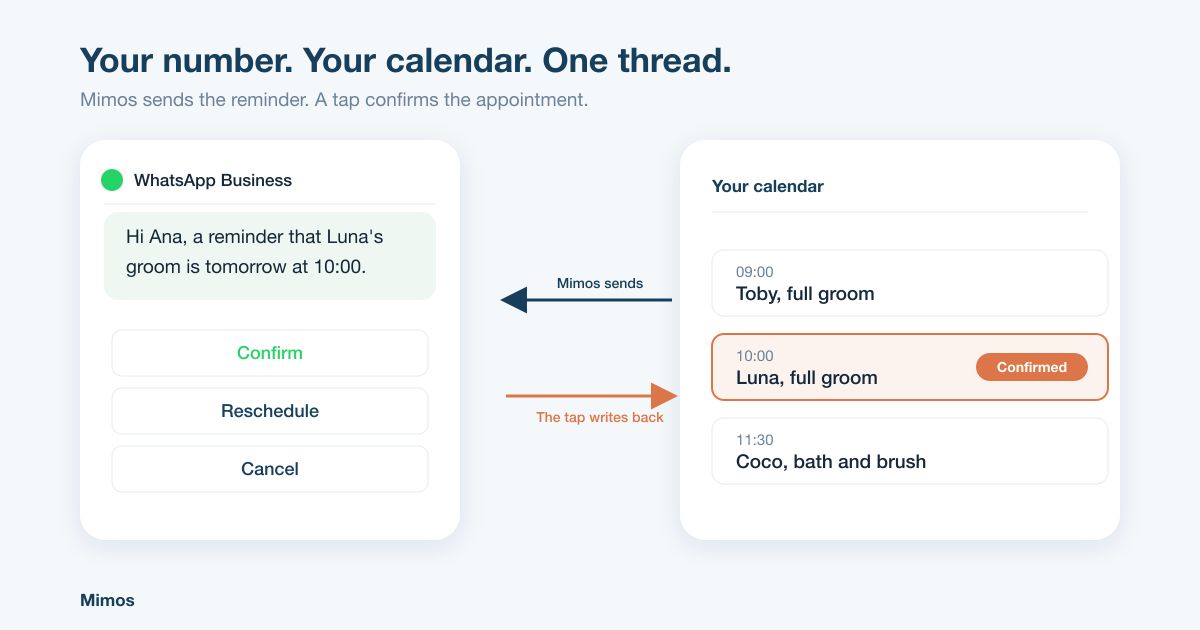
A booking is made and the confirmation goes out with the pet's name, the service and the date. The day before, the reminder arrives with three buttons: confirm, reschedule, cancel. A tap on confirm marks the appointment confirmed in your calendar and you never read a message. Reschedule and cancel send back your booking link instead of starting a negotiation at eleven at night.
Then the rest of the day runs itself. Ready for pickup when the dog is finished. A grooming report with the before and after photos, the coat notes and a date to come back. A rebooking nudge when a regular is due, a birthday message, a quiet note to someone who has drifted away.
Key points
- Booking confirmed, reminders, ready for pickup, grooming reports, rebooking, birthdays and win-backs.
- Reply buttons that update your calendar instead of creating another message to read.
- Up to three reminder rules, with quiet hours and stop once confirmed.
One inbox, your whole team
In the free app there is one phone, and it is yours. In Mimos every conversation lands in a shared inbox your staff answer from their own accounts, while you still reply from your phone if you prefer. Each thread stays bound to the number that received it, so a two-salon business never answers a client from the wrong branch.
When a client writes back you have 24 hours of ordinary free-form chat: photos, voice notes, whatever the conversation needs. Approved wording is only ever needed to start a conversation, never to continue one.
The details that keep you out of trouble
Consent is checked before every automated send. Offers and reminders are kept separate, so a client who stops the promotions still gets their appointment confirmations. Quiet hours mean nothing lands at half past six in the morning. And if a WhatsApp send fails after Meta accepted it, the reminder quietly goes out as an SMS instead of disappearing.
Try it on your own number
Mimos is built for dog groomers, not adapted from a generic booking tool, and WhatsApp is wired into the calendar rather than bolted on beside it. Create an account, connect your number, and the next appointment you book confirms itself.
Frequently asked questions
Do I need a second phone number to use WhatsApp with Mimos?
No. Mimos connects the number you already use, and it keeps working in the WhatsApp Business app on your phone at the same time. Your clients see the same number and the same profile as always.
Does Mimos charge extra for WhatsApp messages?
No. Your WhatsApp Business Account stays yours and Meta bills you directly per conversation, so there is no reseller margin on top. Reminders and confirmations fall in the cheapest category.
Will my clients be talking to a bot?
No. Mimos sends the messages you would have typed anyway: the confirmation, the reminder, the ready for pickup. When a client writes back, you or your team answer.
What if a client has no WhatsApp?
Mimos falls back to SMS, and to email where you have an address. The client gets the reminder either way.
Can I stop using it?
Yes. Disconnect from WhatsApp Business settings on your phone at any time. The app, your number and every chat stay exactly as they were.